Connect care coordination without adding more admin.
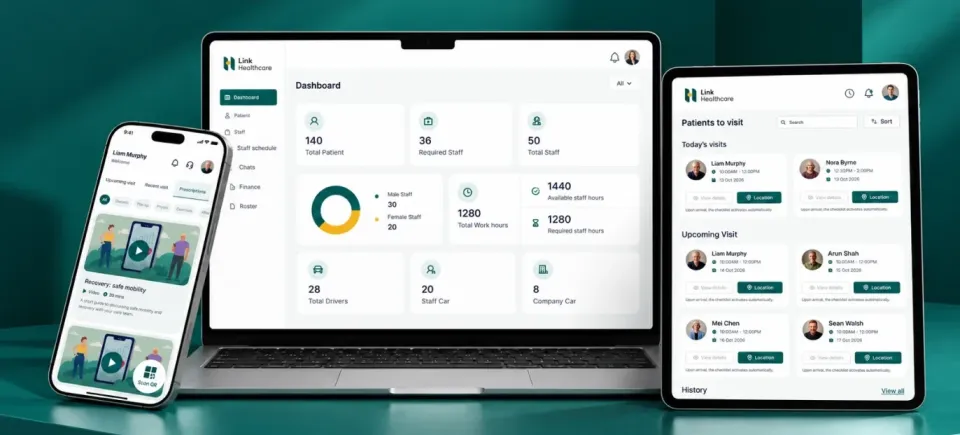
We build operational software around the people delivering, coordinating and receiving care, with access and responsibilities defined for each user group.
One care workflow, different views for each person.
Office teams need oversight. Field staff need clear visit information. Patients and families need appropriate visibility. The system should connect them without giving everyone the same interface or access.
Why custom automation fits clinics and healthcare.
And why it does not have to be expensive. Start with the front desk, such as appointments and reminders, then connect records and billing.
- 01Care workflows differ by practice
Appointments, records, billing and follow-ups vary by speciality and by clinic, and packaged tools are rarely a close fit.
- 02Admin takes time from patients
Front-desk re-entry and chasing reminders by hand take attention away from care.
- 03Per-doctor licences add up
Software priced per clinician becomes expensive as a practice grows. Privacy and access also need to be set to your own rules.
AI has made custom automation faster to build, and better to use.
We use AI throughout the build: drafting and testing code, preparing documentation and checking edge cases, with our engineers reviewing every change. That shortens the path to a first working version, so the scope you pay for goes into your workflow rather than into waiting.
Once the system holds your records, AI can also work inside it: answering questions in plain language, reading documents to fill in fields and flagging items that need attention. These are added only where they save your team real effort.
Built to be inexpensive to run.
Automation should not become another heavy monthly bill.
- 01Your own small server
The system runs on a single server sized to your workload, so hosting stays a small and predictable cost. You pay the hosting provider directly.
- 02Minimal maintenance
There are no per-user licences. After launch we keep upkeep light, with security updates, backups and fixes covered by a small support plan that is agreed up front. If you ever stop, the system keeps running.
- 03Costs agreed before we start
You get a written scope, timeline and price before any work begins. Hosting and maintenance are quoted separately, so there are no surprises later.
Ask questions of your own records.
Begin with approved operational questions such as "Which visits are unassigned tomorrow?" or "How many staff hours are available next week?" Patient-specific access requires explicit controls. The assistant is not a clinical decision-maker.

Three steps to a first release.
- 01
Understand
Map the current workflow and responsibilities.
- 02
Scope
Agree a focused first release and its dependencies.
- 03
Build
Review the working system with the people who will use it.
What clients say.
“We needed one system for our office, our carers and our patients, and Brown Button understood home care as well as the software. Today our team plans over 2,000 hours of care a week on it. They felt like part of our team, not a vendor.”
 Sajeesh KesavanFounder, Link Healthcare
“Livyana is about people supporting each other through health conditions, so the brand had to feel warm and trustworthy. Brown Button got that from our first conversation, and the identity they built is something our community connects with.”
 Mario TorunoFounder, Livyana
What we can build.
- Staff availability
- Visit scheduling
- Care-plan records
- Field updates
- Patient-facing information
- Operational reporting as scoped
Tell us where coordination becomes difficult.
Tell us how the work happens and what you want to improve.
Discuss your workflow